Tag: Chat

  • Introduction to Chatbots: Trends & Best Practices

    Introduction to Chatbots: Trends & Best Practices

    What are Chatbots?

    Chatbots are “computer programs simulating human conversation typically over the internet”. This can apply to both voice and text.  The first chatbot, ELIZA, was introduced in 1966 by Joseph Weizenbaum which was capable of natural language processing.  The second chatbot, PARRY was introduced in 1972.  These first 2 chatbots had a conversation that at best was odd – check it out in the linked article.  

    Types of Chatbots:

    Transactional (or set guidelines) chatbot – This is similar to functionality of a directed dialog IVR where there are predefined options.  We see this oftentimes in retail customer service for inquiries about our recent orders or banking when we want to perform a predictable action such as check a balance or transfer money. 

    Conversational (or machine learning) chatbot – This type of chatbot leverages natural language processing and is conversational.  It needs to be contextually aware.  It can self-learn new dialogues and words.  Examples include ordering a pizza or booking a flight.  According to Accenture, 56% of business leaders surveyed stated that conversational bots were driving disruption in their industry.  
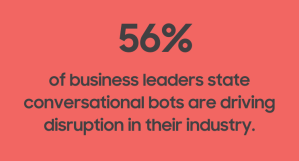
    56% leaders state conversational bots are disruptive


    How are Chatbots Used?

    Chatbots are leveraged for multiple reasons including sales (41%), support (37%), and marketing (17%) – Intercom.  Customer adoption of chatbots has increased dramatically over the last year.  In 2019, 17.1% of customers were willing to use chatbots for purchases.  This rose to 41.3% in 2020 (Salesforce).  Since TD Ameritrade introduced text and voice chatbots in 2017, they haven’t had to hire any new human agents even with additional clients (WSJ). Chatbots can be used internally within your organization providing IT support as well as HR support.  IBM is leveraging Watson AI to handle about 40% of the inquiries from their 350K employees – resulting in not having to backfill HR representatives (WSJ). According to Gartner, by 2022, 70% of office workers will interact with conversational platforms daily.

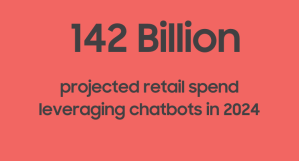
    The chatbot market size is projected to jump from $2.6 billion in 2019 to $9.4 billion by 2024 with a CAGR of 29.7% (Drift).  As a result, retail spend via chatbot will increase from $2.8 billion in 2019 to $142 billion in 2024 (Business Insider).  It’s estimated that 73% of healthcare administrative tasks could be automated by AI including chatbots.   142 Billion retail spend leveraging chatbots in 2024 
     

    How to Get Started

    1. Identify where you are going to use chatbots:  Determine where you are going to leverage chatbots for your initial launch.  Will it be sales, service or marketing or for internal processes?  I recommend launching them for internal support such as IT support or HR first as you are learning the technology and how to apply to your environment.  This will enable a very controlled rollout and lower risk.  
    2. Determine the type of chatbot you will be leveraging:  Will you want to introduce the transactional (set guideline) chatbot or conversational chatbot or try them both?  Both have benefits and can enhance your business.
    3. Identify Reasons for contact that you will be automating:  Identify the top reasons for contact.  For each reason of contact, determine how easily the contact can be automated (if at all).  Once you have mapped the level of effort of automation and the reasons for contact, determine which use cases you can automate first with chatbots and then expand to additional use cases.
    4. Determine your KPIs: Determine what you want to measure with your chatbot implementation.  Depending on your chatbot implementation, you may want to reduce the amount of transfers, increase knowledgebase consumption to deflect contacts or complete transactions and increase sales.  Create reporting to be able to measure your KPIs that you define.
    5. Build your chatbots and tune:  The majority of companies look to external vendors when implementing conversational chatbots.  Identify your partner for implementation and how you will measure success.  Once you rollout, listen to the voice of the customer and tune as needed.
  • Web Chat Best Practices

    Web Chat Best Practices

    According to Forrester Consulting, web chat has many benefits including a 305% ROI in 6 months when used as a sales channel, 120% ROI in 6 months when used as a service channel and 59% call deflection. According to the Benchmark Portal, a webchat contact costs 1/3 the cost of a phone contact. Forrester also predicts that digital customer service interactions will increase by 40% in 2021. The good news? According to Zoho, 2/3 of companies already use live chat for customer support.

    However, customer’s expectations are higher than ever and the majority of companies are not meeting those expectations. Salesforce reports that 71% of customers have used multiple channels to start and complete a single transactions and they expect connected experiences. Whether you are deploying web chat for the first time or even if you already have web chat implemented, now would be a good time to review your chat experience and ensure that you are following best practices and tune where needed.

    1. Determine Your Call to Action Method – Static vs. Proactive: There are 2 types of chat touts – static and proactive.
      • Static – This is sometimes referred to as reactive chat. The chat icon is “always” available on the page and remains there whenever you are on the page. Best practices include having static chat touts (or call to actions) in the same place on each page so your customers can easily find it. Typically these touts are on the right-hand side of the page. Static chat enables a customer to reach out to your organization anytime they have a question. The key to the best customer experience is ensure the chat tout is consistently displayed and highly visible to the customer – don’t require them to try and find the “contact us” page in order to chat with you.
      • Proactive – This is more of a customized experience where the chat icon pops up based on various rules on the website. Various rules can be configured – for example, if a person is idle on a webpage for a configured amount of time or if they abandon their shopping cart, the chat call to action can pop up. This can be a riskier customer experience – if not configured correctly, it can be annoying. If done correctly, it can drive more sales and revenue. If you have proactive deployed, you should look at customer sentiment often to ensure that the chat experience is meeting customer’s needs.
    2. Personalize the Chat Experience – 84% of customers say being treated like a person rather than a number is very important to earning their business (Salesforce). If the customer has authenticated on your website, pass that information to the chat platform if they decide to chat with you. You should not ask for their name or identifying information that you could leverage from your CRM. Additionally, you should also pass the CRM record to the agent when presenting them with the chat. If the customer is not authenticated, if you have a pre-chat form and ask identifying information, send that info to the CRM to personalize the experience.
    3. Provide Expected Wait Time – Expected wait time should be provided to set expectations on how long the caller should expect to wait for an agent. Offer self-service as an alternative but do not force self-service. If you are unable to provide expected wait time, then provide position in queue (which is less helpful as there are many variables that could play into their wait time including average handle time and number of agents that are handling chat).
    4. Pre-Chat Form – If you have several departments handling chat, the ideal routing rules would be using attributes from the page the chat is originating from & customer to route the chat effectively. If that is not possible, use a pre-chat form to ask what they are inquiring about which may include a drop down of topics. Remember to not use company jargon in the drop-down but rather how customers would describe what they would be inquiring about.
    5.  Offer Chat Transcripts – Always offer chat transcripts to the customer so that they have a record of their interaction. Some user interfaces allow the customer to request the chat transcript via email so that the agent doesn’t have to remember to ask. 
    6. Determine After-Hours Treatment – There are a number of different ways to handle after-hours treatment for chat. Customers expectations are to have 24×7 service – some contact centers outsource outside their hours. Some other alternatives include:
      • Leveraging a Chatbot – Leverage a chatbot to handle simple inquiries and if a customer requests to speak with an agent, then advise them of the hours of operation.
      • Remove Chat Tout After-hours – Program the webpage to hide the chat tout call to action when outside of the contact center hours.
      • Display an After-hours Message – If a customer elects to chat afterhours, you could display an after-hours pop-up that provides the hours of operation. This can add friction to the customer interaction due to providing the expectation that they will be chatting based on the availability of the chat tout on the webpage.
      • Provide a “Contact Us” Email Form – Indicate it is after hours and provide a contact us form in which you can respond back to the customer via email. Ensure that your responses for these messages are prioritized as the customer expectations are different for chat vs. email (which customers expect a response in 24 hours).
    7. Agent Training and Chat Procedures –
      • Ensure that your training highlights the differences in email responses and chat responses. Email is much more formal whereas chat is considered more casual and shorter answers are acceptable and most times desired. Oftentimes, responses for emails start as “Thank you for contacting [company] about your issue [restate issue]. We are very sorry about the inconvenience this caused…” For chat, the customer service agent can start addressing the issue/question (of course with empathy) instead of restating the issue.
      • Determine what your company’s personality should be in chat – Can agents use emojis? Is shorthand/acronyms acceptable?
      • Determine how you handle customers that are no longer responsive during chat. How long should an agent wait prior to disconnecting a customer? What messaging should be sent prior to disconnect?
      • Provide quick responses for commonly asked questions, but also encourage free form when it provides a better customer experience
    8. Escalating to Other Channels – If a customer requests to change channels or if the chat needs to escalate into another channel, ensure that the history of the conversation goes with the customer so that they don’t have to repeat themselves.
    9. Concurrent Chats – There is a lot of debate on how many concurrent chats that an agent can handle. Some software programs support 10 or more concurrent chats per agent. It depends on the complexity of the inquiry – I have seen the concurrency typically set between 2-4 concurrent chats. Take a look at how much time the customer is waiting on the agent to respond. If this has been trending higher, then reduce the number of concurrent chats. You can also take a look at customer satisfaction scores to see if the number of concurrent chats is impacting CSAT.
    10. Technology to Support Webchat: There are a number of things to look at when looking at technology that supports web chat. They include:
      • Omnichannel Platform – Having an omnichannel platform will enable customers to easily move between the channels of their choice and having the conversation all on one platform will provide a better customer experience. Threading the entire conversation will enable you to have a holistic view of the customer’s experience rather than have the interactions siloed.
      • Chatbots – Chatbots enable you to provide some pre-queue routing as well as self-service. Think of chatbots as the IVR for chat. I will discuss more about chatbots in a future blog.
      • Co-Browsing – Enabling co-browsing along with chat provides a powerful support tool in which you can show customers how to navigate your company’s webpage as well as quickly see where there may be issues or confusion. This can reduce overall handle time as well as increase customer satisfaction.
      • Analytics – Leveraging analytics – especially with sentiment – you will be able to identify areas that your customers are getting frustrated with chat and address those issues to enhance the customer experience

    Chat is a convenient & powerful communication channel with many options available for configuration and support. Ensuring you have the right configuration, technology and processes in place to support your customer’s needs will ensure you are providing the best customer and agent experience.

  • Long-Term Impacts of COVID-19 on the Contact Center

    Long-Term Impacts of COVID-19 on the Contact Center

    It’s been a year – a year since we went home believing it was 15 days to flatten the curve. We believed we would soon be back in the office and everything would be “business as usual”. While we aren’t sure yet when/if we return to the office and what the new normal will look like, there are a number of trends that will have a long-term impact on the contact center. Today, we will review some of those trends.

    Work From Home will continue: Before the pandemic, it was estimated that less than 5% of US employees worked from home. Work from home had not been fully adopted by businesses for a number of reasons including concerns over productivity and employee engagement. According to Harvard Business Review, full-time remote workers are 5% more likely to be high performers compared to their peers that work in the office. The last year has taught us that the concerns about work from home – whether it is internet quality, dedicated workspace, productivity, employee engagement – have been mitigated and that work from home not only works, but some people thrive in it. Over the course of the next year, as more people are vaccinated, I anticipate that offices will open and travel will resume. However, I don’t expect that we will go back to the way life was in 2019. I anticipate a highly personalized employee experience where employees are given the choice of working from home, in the office or a hybrid of both.

    This opens up a number of opportunities for the contact center including:

    1. Larger talent pool – being able to expand the hiring radius beyond a driveable distance will provide a larger talent pool to recruit and hire from enabling the contact center to hire and retain better talent. According to LinkedIn, 40% of millennials say that work from anywhere is a priority when considering job opportunities.
    2. More flexibility – Staffing based on the intraday requirements rather than the standard 8 hour shift is a win/win for both the contact center and the employees. Providing flexibility in scheduling for employees is enticing for some workers who have to juggle personal commitments with their job. Having a more on-demand workforce that doesn’t have to commute into an office could allow contact centers to react quickly to unexpected spikes in volumes as well.
    3. Savings – There are savings for both the employee and employer when having a remote workforce. This includes savings in work wardrobe, transportation and time for the employee and the employer can reduce their facilities costs including real-estate, energy and maintenance costs.

    Omnichannel Cloud Contact Center Technology is critical for providing a better customer experience: Having modern technology that not only supports work from home, but also offers flexibility and provides customers with digital channel support is critical moving forward. Some of the impacts on the ways customers interact, or want to interact, has dramatically changed due to COVID. This includes:

    1. Preference for Digital Channels: With the increase of e-commerce and online shopping during COVID, customers preferences have shifted to digital interactions. According to The Northridge Group, 63% of customers tried digital applications during the pandemic and 75% of those customers will continue to use them after the pandemic. The preference for digital channels has increased to 38% in 2020. Companies need to offer support in a number of digital channels including chat, messaging and social media to reduce overall customer effort and build stickiness with the customer.
    2. Customers engage in more than one channel when reaching out to a company: According to Microsoft, on average, a customer uses 3-5 channels to communicate with a company. According to Salesforce, 71% of customers have used multiple channels to start and complete a single transaction and 69% of customers expect those experiences to be connected. Therefore, to offer the best customer experience, not only does a company need to provide service in multiple channels, they need to connect those engagements so that the conversation is threaded between all the various channels that a customer wants to engage. An omnichannel contact center platform that provides a history of interactions as well as showing pending interactions will enhance the customer experience as well as increase efficiencies.

    Customers will continue to want to be able to self-serve: Self-service is a great way to decrease overall contacts coming into your customer service organization. Self-service can be designed in a way that reduces overall customer effort which results in higher customer loyalty. According to The Northridge Group, 77% of customers will prefer self-service tools after the pandemic. This can come in the form of FAQs on your website, chat bots, IVRs, virtual assistants and leveraging AI.

    Customers continue to want personalized experiences that are low effort: Customers expect that you know them, know their preferences and know their history with your company. In fact, according to Salesforce, 84% of customers state that a personalized experience is very important to them. Customers will continue to want low effort interactions – first contact resolution will be critical. During COVID, customers reported that first contact resolution declined from 53% to 42%, resulting in an overall increase in customer effort. Companies will need to continue to focus on increasing first contact resolution and identify areas of friction that can be removed. The effortless experience will be critical in winning and retaining customers.

    COVID has changed customer’s expectations and how customer service will operate in the future. These changes such as work from home, self-service and choice of channel are here to stay and will ultimately enhance the customer experience and drive loyalty. Continuing to focus on lowering customer effort and driving up first contact resolution will be imperative to increase customer loyalty and drive revenue.

    This component should

    In addition, it suggests that the individual writing your essay doesn’t have the ability to compose a first essay, and therefore don’t even attempt to proofread it, simply leave it to someone

    Your academic advisor or professor is going to want to observe that your term paper was researched thoroughly before they give it to you https://www.affordable-papers.net/ for comments.

    else.

    depend on the findings you’ve presented in your thesis statement.

  • So Many Channels – Where Do You Get Started?

    So Many Channels – Where Do You Get Started?

    Change can be scary. Change is also necessary. For contact centers if you are are not exploring new and innovative ways to interact with your customer, then you are falling behind your competitors.

    If you are managing a contact center that predominantly focuses on phone and email as your primary service channels or if you are a contact center manager that is considering adding additional service channels, but don’t know where to start, this blog is for you. Today, we will be discussing the whys and how to add additional contact center channels to your service model. There are so many different channels – phone, email, chat, SMS (proactive & 2-way), messaging, social, FAQs, etc. It can be overwhelming – here are some tips to help you get started.

    According to PwC, 33% of customers will leave a brand they love after 1 bad experience and 92% of customers would leave a brand after 2-3 poor experiences. In addition, according to Nuance, 67% of customers prefer self-service than to speak with a customer service representative. In addition, according to this Inc. article, 42% of customers prefer chat with a 92% satisfaction rating when leveraging chat.

    Start with the customer journey – Adding channels to your contact center should not be left to chance and the rolling of the dice. You want to focus on your customers and their journeys when interacting with your brand. An effective customer journey starts with identifying the various personas that interact with your company. Start thinking about how those personas interact with your company from receiving marketing, through the sales and post-sales to service.

    Questions to think about when mapping your customer journey:

    • Where are there points of friction in which customers may have to contact customer service?
    • How do customers reach customer service today? Does that meet their needs?
    • What channels should you offer? What would your customers prefer?
    • How do you remove the points of friction to eliminate contacts into Customer Service?
    • What are the emotions at each point of the journey? How can you turn negative emotions into neutral or better yet, positive emotion?

    Right-Channeling: Now that you have your customer journeys documented and have started to look at removing areas of friction, you also want to look at ways to offer the best channel for the reason of contact. According to Deloitte’s 2019 Global Contact Center Report, 81% of companies have expanded the number of customer support channels, but about one-third of those companies haven’t been able to effectively transition customers to lower cost channels. A couple of things to highlight, not all channels are ideal for all types of inquiries. Social Media and messaging are typically best suited for easier inquiries while phone is best for more complex inquiries. In addition, change management is important to ensure customer adoption of new channels. There are things you can do to enable adoptions and help with right-channeling your customer support:

    • Omni-channel Contact Center platform – You need a strong omni-channel contact center platform in which you can readily and easily change channels and see the customer journey along the way. Often-times customers will use multiple channels to get support and you need contextual history across all channels.
    • Channel Harmonization – Evaluate whether you are able to provide the same level of support on the various channels. Areas to evaluate include customer identification, self-service across channels (think bots and AI) as well as agent experience across channels. You want to be able to provide similar experiences regardless of what channel the customer chooses. In addition, for the most complex contacts, you may want to look at a strategy to offer voice as the preferred channel since most customers find that phone is the best channel for the most complex interactions.
    • Change Management & promotion of new channels – Evaluate where you promote each channel. Are they promoted the same? Are there some channels that are promoted more than others? Why? Take a look at your ideal customer experience and then evaluate where you need to make changes in your marketing materials and website to promote new channels that have been introduced. For example, if you are offering webchat, do you consistently offer the same call to action across your website? For the contact us page, are all your customer service channels advertised? It is natural during launch to see an incremental increase in overall contact center volume as well as it may take some time for your agents to become proficient at handling the new contact type. You will want to ensure that your staffing plan takes this into account and plan for additional staff during launch to ensure a great customer experience.

    Now that your customers are adopting the channels, start analyzing the customer experience. You will want to:

    • Tie customer sentiment back to channel: Are certain channels correlated with higher customer sentiment than others? Take a look at customer sentiment linked to both the contact type and reason for contact to see if there is additional tuning to be done on your right-channeling strategy.
    • Quality Management: Ensure that you are looking across all channels when taking a look at quality management and agent feedback. With each new channel, you will need to identify what great looks like and what you want to measure for quality.
    • Omnichannel Analytics: You will want to ensure that you are applying analytics to all contact types. As you add more channels, ensure that these are tried back to your omnichannel analytics so you can have a comprehensive dataset when taking a look at your contact drivers and sentiment.
    • Forecasting & Staffing: As you start creating a new baseline for the new channel, build this into your forecast and staffing plan. Is this new channel driving up volume, driving down volume or is volume remaining the same? Are there staffing changes that you need to make based on this?

    Adding channels to your contact center takes planning, the right technology and continuous listing & tuning. Providing choices to your customers on the way they interact with your company is critical to providing a great customer experience.

  • Web Chat Best Practices

    Web Chat Best Practices

    According to Forrester Consulting, web chat has many benefits including a 305% ROI in 6 months when used as a sales channel, 120% ROI in 6 months when used as a service channel and 59% call deflection. According to the Benchmark Portal, a webchat contact costs 1/3 the cost of a phone contact. Forrester also predicts that digital customer service interactions will increase by 40% in 2021. The good news? According to Zoho, 2/3 of companies already use live chat for customer support.

    However, customer’s expectations are higher than ever and the majority of companies are not meeting those expectations. Salesforce reports that 71% of customers have used multiple channels to start and complete a single transactions and they expect connected experiences. Whether you are deploying web chat for the first time or even if you already have web chat implemented, now would be a good time to review your chat experience and ensure that you are following best practices and tune where needed.

    1. Determine Your Call to Action Method – Static vs. Proactive: There are 2 types of chat touts – static and proactive.
      • Static – This is sometimes referred to as reactive chat. The chat icon is “always” available on the page and remains there whenever you are on the page. Best practices include having static chat touts (or call to actions) in the same place on each page so your customers can easily find it. Typically these touts are on the right-hand side of the page. Static chat enables a customer to reach out to your organization anytime they have a question. The key to the best customer experience is ensure the chat tout is consistently displayed and highly visible to the customer – don’t require them to try and find the “contact us” page in order to chat with you.
      • Proactive – This is more of a customized experience where the chat icon pops up based on various rules on the website. Various rules can be configured – for example, if a person is idle on a webpage for a configured amount of time or if they abandon their shopping cart, the chat call to action can pop up. This can be a riskier customer experience – if not configured correctly, it can be annoying. If done correctly, it can drive more sales and revenue. If you have proactive deployed, you should look at customer sentiment often to ensure that the chat experience is meeting customer’s needs.
    2. Personalize the Chat experience – 84% of customers say being treated like a person rather than a number is very important to earning their business (Salesforce). If the customer has authenticated on your website, pass that information to the chat platform if they decide to chat with you. You should not ask for their name or identifying information that you could leverage from your CRM. Additionally, you should also pass the CRM record to the agent when presenting them with the chat. If the customer is not authenticated, if you have a pre-chat form and ask identifying information, send that info to the CRM to personalize the experience.
    3. Provide Expected Wait Time – Expected wait time should be provided to set expectations on how long the caller should expect to wait for an agent. Offer self-service as an alternative but do not force self-service. If you are unable to provide expected wait time, then provide position in queue (which is less helpful as there are many variables that could play into their wait time including average handle time and number of agents that are handling chat).
    4. Pre-Chat Form – If you have several departments handling chat, the ideal routing rules would be using attributes from the page the chat is originating from & customer to route the chat effectively. If that is not possible, use a pre-chat form to ask what they are inquiring about which may include a drop down of topics. Remember to not use company jargon in the drop-down but rather how customers would describe what they would be inquiring about.
    5. Offer Chat Transcripts – Always offer chat transcripts to the customer so that they have a record of their interaction. Some user interfaces allow the customer to request the chat transcript via email so that the agent doesn’t have to remember to ask.
    6. Determine After-Hours Treatment – There are a number of different ways to handle after-hours treatment for chat. Customers expectations are to have 24×7 service – some contact centers outsource outside their hours. Some other alternatives include:
      • Leveraging a Chatbot – Leverage a chatbot to handle simple inquiries and if a customer requests to speak with an agent, then advise them of the hours of operation.
      • Remove Chat Tout After-hours – Program the webpage to hide the chat tout call to action when outside of the contact center hours.
      • Display an After-hours Message – If a customer elects to chat afterhours, you could display an after-hours pop-up that provides the hours of operation. This can add friction to the customer interaction due to providing the expectation that they will be chatting based on the availability of the chat tout on the webpage.
      • Provide a “Contact Us” Email Form – Indicate it is after hours and provide a contact us form in which you can respond back to the customer via email. Ensure that your responses for these messages are prioritized as the customer expectations are different for chat vs. email (which customers expect a response in 24 hours).
    7. Agent Training and Chat Procedures –
      • Ensure that your training highlights the differences in email responses and chat responses. Email is much more formal whereas chat is considered more casual and shorter answers are acceptable and most times desired. Oftentimes, responses for emails start as “Thank you for contacting [company] about your issue [restate issue]. We are very sorry about the inconvenience this caused…” For chat, the customer service agent can start addressing the issue/question (of course with empathy) instead of restating the issue.
      • Determine what your company’s personality should be in chat – Can agents use emojis? Is shorthand/acronyms acceptable?
      • Determine how you handle customers that are no longer responsive during chat. How long should an agent wait prior to disconnecting a customer? What messaging should be sent prior to disconnect?
      • Provide quick responses for commonly asked questions, but also encourage free form when it provides a better customer experience
    8. Escalating to Other Channels – If a customer requests to change channels or if the chat needs to escalate into another channel, ensure that the history of the conversation goes with the customer so that they don’t have to repeat themselves.
    9. Concurrent Chats – There is a lot of debate on how many concurrent chats that an agent can handle. Some software programs support 10 or more concurrent chats per agent. It depends on the complexity of the inquiry – I have seen the concurrency typically set between 2-4 concurrent chats. Take a look at how much time the customer is waiting on the agent to respond. If this has been trending higher, then reduce the number of concurrent chats. You can also take a look at customer satisfaction scores to see if the number of concurrent chats is impacting CSAT.
    10. Technology to Support Webchat: There are a number of things to look at when looking at technology that supports web chat. They include:
      • Omnichannel Platform – Having an omnichannel platform will enable customers to easily move between the channels of their choice and having the conversation all on one platform will provide a better customer experience. Threading the entire conversation will enable you to have a holistic view of the customer’s experience rather than have the interactions siloed.
      • Chatbots – Chatbots enable you to provide some pre-queue routing as well as self-service. Think of chatbots as the IVR for chat. I will discuss more about chatbots in a future blog.
      • Co-Browsing – Enabling co-browsing along with chat provides a powerful support tool in which you can show customers how to navigate your company’s webpage as well as quickly see where there may be issues or confusion. This can reduce overall handle time as well as increase customer satisfaction.
      • Analytics – Leveraging analytics – especially with sentiment – you will be able to identify areas that your customers are getting frustrated with chat and address those issues to enhance the customer experience

    Chat is a powerful communication channel with many options available for configuration and support. Ensuring you have the right configuration, technology and processes in place to support your customer’s needs will ensure you are providing the best customer and agent experience.