Tag: Automation

  • Introduction to Chatbots: Trends & Best Practices

    Introduction to Chatbots: Trends & Best Practices

    What are Chatbots?

    Chatbots are “computer programs simulating human conversation typically over the internet”. This can apply to both voice and text.  The first chatbot, ELIZA, was introduced in 1966 by Joseph Weizenbaum which was capable of natural language processing.  The second chatbot, PARRY was introduced in 1972.  These first 2 chatbots had a conversation that at best was odd – check it out in the linked article.  

    Types of Chatbots:

    Transactional (or set guidelines) chatbot – This is similar to functionality of a directed dialog IVR where there are predefined options.  We see this oftentimes in retail customer service for inquiries about our recent orders or banking when we want to perform a predictable action such as check a balance or transfer money. 

    Conversational (or machine learning) chatbot – This type of chatbot leverages natural language processing and is conversational.  It needs to be contextually aware.  It can self-learn new dialogues and words.  Examples include ordering a pizza or booking a flight.  According to Accenture, 56% of business leaders surveyed stated that conversational bots were driving disruption in their industry.  
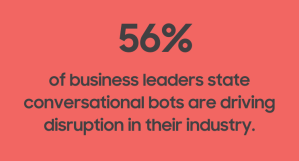
    56% leaders state conversational bots are disruptive


    How are Chatbots Used?

    Chatbots are leveraged for multiple reasons including sales (41%), support (37%), and marketing (17%) – Intercom.  Customer adoption of chatbots has increased dramatically over the last year.  In 2019, 17.1% of customers were willing to use chatbots for purchases.  This rose to 41.3% in 2020 (Salesforce).  Since TD Ameritrade introduced text and voice chatbots in 2017, they haven’t had to hire any new human agents even with additional clients (WSJ). Chatbots can be used internally within your organization providing IT support as well as HR support.  IBM is leveraging Watson AI to handle about 40% of the inquiries from their 350K employees – resulting in not having to backfill HR representatives (WSJ). According to Gartner, by 2022, 70% of office workers will interact with conversational platforms daily.

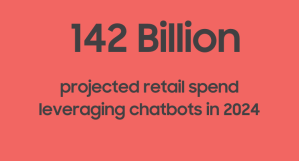
    The chatbot market size is projected to jump from $2.6 billion in 2019 to $9.4 billion by 2024 with a CAGR of 29.7% (Drift).  As a result, retail spend via chatbot will increase from $2.8 billion in 2019 to $142 billion in 2024 (Business Insider).  It’s estimated that 73% of healthcare administrative tasks could be automated by AI including chatbots.   142 Billion retail spend leveraging chatbots in 2024 
     

    How to Get Started

    1. Identify where you are going to use chatbots:  Determine where you are going to leverage chatbots for your initial launch.  Will it be sales, service or marketing or for internal processes?  I recommend launching them for internal support such as IT support or HR first as you are learning the technology and how to apply to your environment.  This will enable a very controlled rollout and lower risk.  
    2. Determine the type of chatbot you will be leveraging:  Will you want to introduce the transactional (set guideline) chatbot or conversational chatbot or try them both?  Both have benefits and can enhance your business.
    3. Identify Reasons for contact that you will be automating:  Identify the top reasons for contact.  For each reason of contact, determine how easily the contact can be automated (if at all).  Once you have mapped the level of effort of automation and the reasons for contact, determine which use cases you can automate first with chatbots and then expand to additional use cases.
    4. Determine your KPIs: Determine what you want to measure with your chatbot implementation.  Depending on your chatbot implementation, you may want to reduce the amount of transfers, increase knowledgebase consumption to deflect contacts or complete transactions and increase sales.  Create reporting to be able to measure your KPIs that you define.
    5. Build your chatbots and tune:  The majority of companies look to external vendors when implementing conversational chatbots.  Identify your partner for implementation and how you will measure success.  Once you rollout, listen to the voice of the customer and tune as needed.

  • What is Your Queuing Strategy?

    What is Your Queuing Strategy?

    We’ve all been there as a customer – having to call into customer care, only to hear “Your call is important to us. Please continue to hold for the next available representative” and then waiting for what seems like an eternity, listening to Muzak while our frustration builds. During the pandemic, we have seen call volumes into the contact center rise to unprecedented levels which resulted in high queue times. This is not a time for brands to turn off channels, but rather to offer customer-centric options to their customers to reach customer care.

    There are some things you can do to make this a better experience for your customers. Here are some suggestions:

    1. Play expected wait time for your customers – Informing customers of the wait time will provide them with the information they need to determine if they want to change channels or abandon and call back at another time.
    2. Provide an option for callback – After playing expected wait time offer the customer an option to receive a callback rather than wait in queue. This will provide a better customer experience.
    3. Deflect to digital – Provide the customer options to change channels. With today’s technology, some contact center platforms are able to detect when a caller is calling from a mobile phone. This will provide you with multiple options to provide better service to customers such as offering to continue to the conversation in chat, messaging or SMS and offering to send a link to the customer. This is a win-win for both the customer and the company as these digital channels typically cost less than a phone call and the customer could get their question answered more quickly resulting in a better customer experience.
    4. Virtual assistants – While in queue, offer virtual assistants. You can hold the customers place in queue while trying to solve their issue through a virtual assistant.
    5. Leverage omnichannel routing – By routing all channels (phone, email, chat, social, messaging, SMS, etc.) through a single platform, you will be able to prioritize each channel differently. Real-time contacts such as webchat and phone calls should be prioritized over asynchronous channels such as email and messaging. In addition, routing pending contacts from the same customer to the agent can increase efficiency and improve customer satisfaction. For example, if a customer first emails your company, then posts on social media, and also calls the company, having all 3 of those contacts being presented to an agent simultaneously will ensure that all 3 of those contact can be handled at once.

    In addition to providing queuing strategies to improve customer experience in the moment, you will also want to look at contact drivers to determine how you can lower overall volumes coming into your contact center. In future articles, we will discuss strategies on how you can look at customer journeys and leverage analytics to identify customer friction areas that should be addressed in your organization.

  • What Does Your IVR Say to Your Customers?

    What Does Your IVR Say to Your Customers?

    The IVR – it’s probably the technology with the worst reputation in the contact center. We all have our IVR horror stories – getting stuck in IVR “jail” where 0 does not get us to an agent, speech enabled IVRs that don’t understand what we are saying, being routed through menu after menu after menu just to get to an agent. According to this Forbes article by Shep Hyken, 39% of customers would rather clean a toilet than interact with an IVR to get their questions answered.

    Your IVR does not have to be a horror story, but rather can (and should) be a useful tool to enable your customers to get information & assistance quickly and enhance their customer experience. The key to a successful IVR implementation is to ensure that you focus on the design and execution for a customer-centric experience.

    As you work through your design, you want to balance automation and deflections with personalization and ease – customers are more likely to do business with a company that makes it easy. You should also look at your various personas that contact your company and their customer journeys – where in their customer journeys are they needing to contact you and why? Are there ways to reduce the need to contact you by proactively addressing areas of friction in the customer journey? Regardless of removing the areas of friction, inevitably customers will need to speak with your customer service department and leveraging an IVR can be an effective way to ensure that they get the assistance they need. Below are some guidelines when designing your IVR.

    1. Avoid Company jargon when routing – Build the IVR with your customer in mind – avoid company jargon, but rather think about how a customer would describe their needs. If you are uncertain, listen to your call recordings to capture the questions that customers are asking. For instance, instead of saying “For accounts payable” you could say “for questions about your invoice”. This will ensure a better customer experience and reduce the number of customers pressing 0 to speak with a customer service representative.
    2. Program open hours and closed hours with different treatments – Don’t force a customer to navigate an IVR during closed hours only to be told that you are closed when opting out to an agent. You can still provide self-service during closed hours while notifying a customer that the contact center is closed prior to routing them into self-service.
    3. Always allow a customer the option to speak with an agent – The IVR should not be a “gatekeeper” to prevent callers from speaking to an agent. Providing a great customer experience includes enabling the customer to do business with you in the channel of your choice. Preventing a customer from being able to speak to an agent may lead to a short-term “containment”, but could lead to a longer-term issue with customer churn and dissatisfaction.
    4. The IVR’s primary function is for routing, not reporting – While there is robust reporting in modern IVRs, do not create unnecessary options to get reasons why a customer is calling. This is not the most accurate way to get reasons for contacts – use contact dispositions for “reasons for contacts”, not the IVR.
    5. The IVR’s primary function is for routing, not marketing – Do not force customers to listen to marketing or unnecessary messaging in the IVR. In the year 2021, customers know that they could go to your website to look at FAQs or engage in digital interactions. However, they have selected to call you. Also, never, EVER, EVER use the phrase “Please listen carefully, our options have changed”in your IVR. This is like nails down a chalkboard – oftentimes these announcements play for weeks or months on end inadvertently and are not effective for the callers as callers have become immune to this phrase. If you want to show that your menu has changed for frequent callers, there are other ways you can achieve this such as using a different voice or slightly changing the greeting.
    6. Personalize the experience with integrations – What are all the customer touchpoints into your company? What are the top reasons that customers contact your customer service organization? Are there ways to make it easier to provide the customer this information without them speaking with an agent? Personalization is more than customer identification. Customer identification is the first step of personalization. Leverage your CRM, ERP, WMS and other systems to get the context as to why this customer may be contacting you – Did they place an order recently, but haven’t received it? Did they receive an invoice recently? Did they receive a marketing contact recently that they may be contacting you about? Curate the IVR experience with the customer in the center and the options dynamic to the customer’s needs based on the data and information you have in your business systems.
    7. Keep the menus short – Menus should be 5 options or less and should be no more than 30 seconds. Play the most frequent options first.
    8. Provide contextual information to the agent if the customer opts to speak with an agent. The customer does not want to have to repeat themselves – ensure that you provide the customer information and context from the IVR to the agent- this is a win/win for both the customer and agent. The customer won’t have to repeat themselves and it saves time for the agent.
    9. Testing & Tuning – Leverage your business partners and agents to test your IVR. They will be helpful in identifying where there could be potential customer friction and issues in routing that you may not have anticipated during your initial design. While designing, you have the best intentions with diagramming your call flows, but it definitely doesn’t take the place of user testing and then tuning where you can optimize the call flows. This is your opportunity to fine-tune the experience to make it even more customer centric.
    10. Continued Tuning of the IVR – After going live with your new IVR design, continue to look at reports and metrics for areas of opportunity. What is the IVR containment rate – is it higher or lower than anticipated? What percentage of callers are pressing 0 & why? Are you able to identify a high percentage of customers – if not, how can you remediate this? Do the options that the customers are choosing match the disposition for the reason for contact? If not, there may be opportunities for additional tuning of the IVR experience. What is your transfer rate after going live – is it better or worse than before? Look at ways you can improve the customer experience in the IVR to drive down transfers.

    The IVR can be a useful tool in routing and self-service. By providing a dynamic, personalized IVR experience for the customer that is useful and easy will enhance the overall customer experience. This will lead to higher customer loyalty and stickiness.